
Channel Alerts
Alerts let you know when there is an issue with one of your channels.
SCP Alerts

SCP is an algorithm for detecting problems in an audio signal. It is designed for use with live microphones. SCP alerts appear when you might have a broken mic cable or other unwanted signal.
You can adjust the SCP alert level to your liking in the Preferences
window (⌘P).
- High sensitivity - More alarms, highly sensitive to issues with audio signal
- Low sensitivity - Fewer alarms, more robust
Hardware Alerts

Low RF: Appears when the incoming RF signal drops below user-defined threshold. The alert disappears when the RF level is no longer low.
- Turn off this alert for individual channels in Channel I/O.
- Adjust the RF threshold and alert behavior in the Preferences window (⌘P).
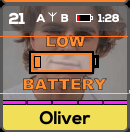
Low Battery: Appears if the battery status goes below a
user-defined threshold. Adjust the battery alert threshold in the
Preferences window (⌘P).
Note: Wavetool is dependent on
receiver data to convey the correct battery
information.