Select a Network Interface
Connect to a network interface to communicate with your devices using Wireless Workbench.
- Select a network. You'll have an option to do this when you open Wireless Workbench,
and you can click the network status indicator any time to update your network
preferences. The network status indicator:
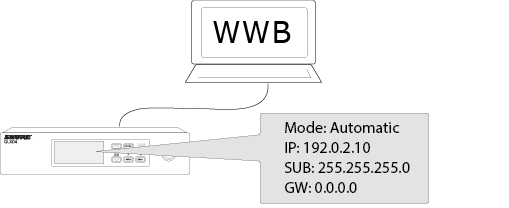
- Find the correct interface. Open the network menu of one of your devices and take
note of its IP address. In the example shown, the IP address for the receiver is
192.0.2.10.
- Compare the IP address assigned to the component to the available IP addresses
listed in to the Network Preferences window. Choose the network that closely
matches the numbering order and format of the IP address of the component. If your
device IP address is 192.0.2.10, you might choose a network that begins with
192.0.2.Note:The last few numbers will not match exactly.
- Save your changes.